


Your warehouse returns desk needs tested scanners, clear grading rules and a working spare before Christmas purchases start coming back. For January 2027, check the whole process now: can staff identify a parcel, record its condition and send it to the right place without leaving the station?
A single bench handling occasional returns may only need a corded scanner and a PC. This guide is for ecommerce fulfilment centres, 3PLs and retail distribution centres adding stations or shifts for Christmas returns. Start with the workflow, then choose the devices and support that keep it moving.
On this page:
- Why prepare before January?
- The six steps in warehouse returns processing
- Which device fits each step?
- What does scanner downtime cost?
- When is a cheaper scanner enough?
- Spares, repairs and seasonal staff
- Six questions to answer before January
- Frequently asked questions
Why prepare your warehouse returns desk before January?
Last season shows why preparation matters. Ahead of Takeback Tuesday on 6 January 2026, Royal Mail expected around half a million items to be returned that day. This was a carrier forecast for that period, rather than a prediction for January 2027. Royal Mail statement, reproduced by Insight DIY, 5 January 2026
The pressure can start earlier. ZigZag's data for the 2025–26 peak season identified 29 December as its busiest day for returns requests. That measures requests in its network, rather than parcels arriving at every warehouse. It is a reason to prepare before Christmas instead of relying on a quiet week afterwards. Retail Times, 16 January 2026
In the US, NRF and Happy Returns estimated that 17% of holiday sales would be returned in 2025. Treat that as historical context, not your site's forecast. Build staffing and device numbers around your own order volumes, return windows and last season's busiest days. NRF winter holiday FAQs
An outbound order has a pick list. A return may arrive with a carrier label, a returns reference or no paperwork at all. Extra staff help only if they have working devices, the right app permissions and a clear way to handle exceptions.
The six steps in warehouse returns processing
Follow one parcel through the desk. Each handover should leave a record that the next person can use.
- Receive. Scan the carrier label where supported and record arrival. Keep the parcel reference attached to the physical item.
- Match. Link the parcel and its contents to the original order or return merchandise authorisation (RMA). A carrier barcode alone may not identify the item inside.
- Inspect and grade. Check the product, quantity, accessories and condition. Record a consistent grade and capture photos where your process requires evidence.
- Decide. Route the item to saleable stock, refurbishment, supplier return, B-grade resale or recycling. Hold unidentified or disputed items in an exception location.
- Relabel. Produce any replacement product or location labels. Confirm the label matches the item before it moves.
- Put away and update. Scan the destination and update stock status. Trigger refund or exchange updates according to the retailer's policy and applicable requirements; they do not always wait for put-away.
Keep ungraded returns out of saleable stock. Otherwise an item can appear available online before anyone has checked whether it can be sold again.
Test one exception as well as one straightforward return: an unreadable label, a missing order reference or the wrong item in the box. Staff need a defined route for each, rather than a growing pile beside the scanner.
Which device fits each returns step?
Match the device to the task and the software. A scanner reads data; your returns application must recognise it and update the right record.
| Step | What to test | Suitable starting point |
|---|---|---|
| Receive at the dock | Carrier labels, lighting, working temperature and handling | Handheld computer with a 2D imager |
| Match to the order | Your RMA format, 1D and 2D codes, exception lookup | 2D scanner with a PC or handheld running the returns app |
| Inspect and grade | Checklist readability, usable photos and attachment to the order | Tablet or PC workstation with a suitable camera |
| Repetitive sorting | Pairing, scan feedback and comfort while handling parcels | Wearable scanner connected to the host application |
| Relabel and put away | Printer support, label format, Wi-Fi coverage and location scans | Compatible handheld or tablet and label printer |
A 1D-only barcode reader cannot decode a QR code. However, a customer's printerless QR code may be used at a carrier drop-off point and replaced by a physical label before the parcel reaches you. Test the codes that actually arrive at your desk. Creased, faded or damaged labels also need trials; a 2D imager does not guarantee every label will read.
Dock and put-away: Conker SX65
The SX65 has a 6.5-inch display, Android 14, a Newland CM60 2D scanner and a user-swappable 5,000mAh battery. Its published specifications list IP67 protection, a 1.5-metre drop test and a 13MP rear camera. Test your returns app and photo workflow on the proposed configuration before rollout. SX65 datasheet
Grading bench: Conker SX88
The SX88 combines an 8-inch display, Android 13 and a 16MP autofocus rear camera. Its datasheet lists IP68 protection, repeated drops from 1.2 metres and a single drop from 1.5 metres. The Newland N1 2D scanner is optional, so specify it when ordering if the bench needs integrated scanning. Its 10,000mAh battery is not user-swappable. SX88 datasheet
The optional desk dock provides USB, Ethernet and serial connections. Confirm Android drivers, printer language and returns-software support before choosing a label printer: a matching port does not establish compatibility. SX88 dock specifications
High-volume sort: wearable scanning
A wearable scanner can suit repeated scans while staff handle parcels. Check the selected model's host connection, barcode support, battery arrangement and comfort over a real shift. Our wearable versus handheld guide explains the trade-offs. Keep configurations consistent where possible; mixed device fleets add training and support work.
What does scanner downtime cost at the returns desk?
Measure the interruption to processing as well as the repair bill. A device failure might stop a station, send someone looking for a spare or leave work waiting for another operator.
Here is a simple illustration using assumed figures, not a forecast or a Conker performance claim:
| Assumption | Example |
|---|---|
| Returns processed per station per hour | 30 |
| Station unavailable | 45 minutes |
| Processing capacity delayed | About 23 returns |
The calculation is 30 × 45 ÷ 60 = 22.5 returns. This is delayed capacity, not necessarily lost throughput: another station or later overtime may recover it. Add your actual labour, IT support and repair costs, and consider how a backlog affects refund updates.
A configured spare can shorten the interruption. Include spare devices, batteries, docks, software and support when comparing options with our total cost of ownership calculator.
When is a cheaper scanner enough?
A fixed returns bench handling modest volumes can work well with a corded 2D scanner plugged into a PC. If the PC already runs the returns software and staff stay at the bench, a handheld computer may add little value. Our handheld barcode scanner buyer's guide compares the options.
A consumer smartphone may also suit occasional returns if the app, camera and scanning performance meet the task. Trial awkward labels, gloves and a full shift before committing. Shared use, frequent drops and long periods away from charging make durability and battery arrangements more relevant.
Choose on measured workflow needs. A rugged device still needs suitable software, reliable connectivity and a recovery plan.
How do you plan spares, repairs and seasonal access?
Keep a configured spare ready and test the handover before peak. For models with removable batteries, charge replacements and check their condition. For fixed-battery tablets, plan dock access or a spare unit.
Conker's published warranty tiers distinguish hardware-fault cover under RELAX, accidental-damage cover under RELAX Plus, and additional lifecycle services under RELAX 360. Confirm the tier on your quotation. The one-day repair turnaround is a target from receipt, not a guarantee, and excludes transit time. Free collection and return applies to UK mainland customers; surcharge limits and battery thresholds also apply. US sites should confirm their service arrangements separately. Warranty terms
For seasonal teams, use individual app accounts and the permissions each role needs. Mobile device management can help provision devices, restrict apps and manage updates. Confirm features for the operating system and enrolment mode you choose. Sign users out at shift change and retain inspection photos in the approved system, rather than leaving them on a shared device.
Run a complete test: receive a parcel, find the order, record a grade, attach a photo, print a label and scan the location. Then repeat it on the spare. Our pre-peak scanner checklist helps structure the wider checks.
Six questions to answer before January
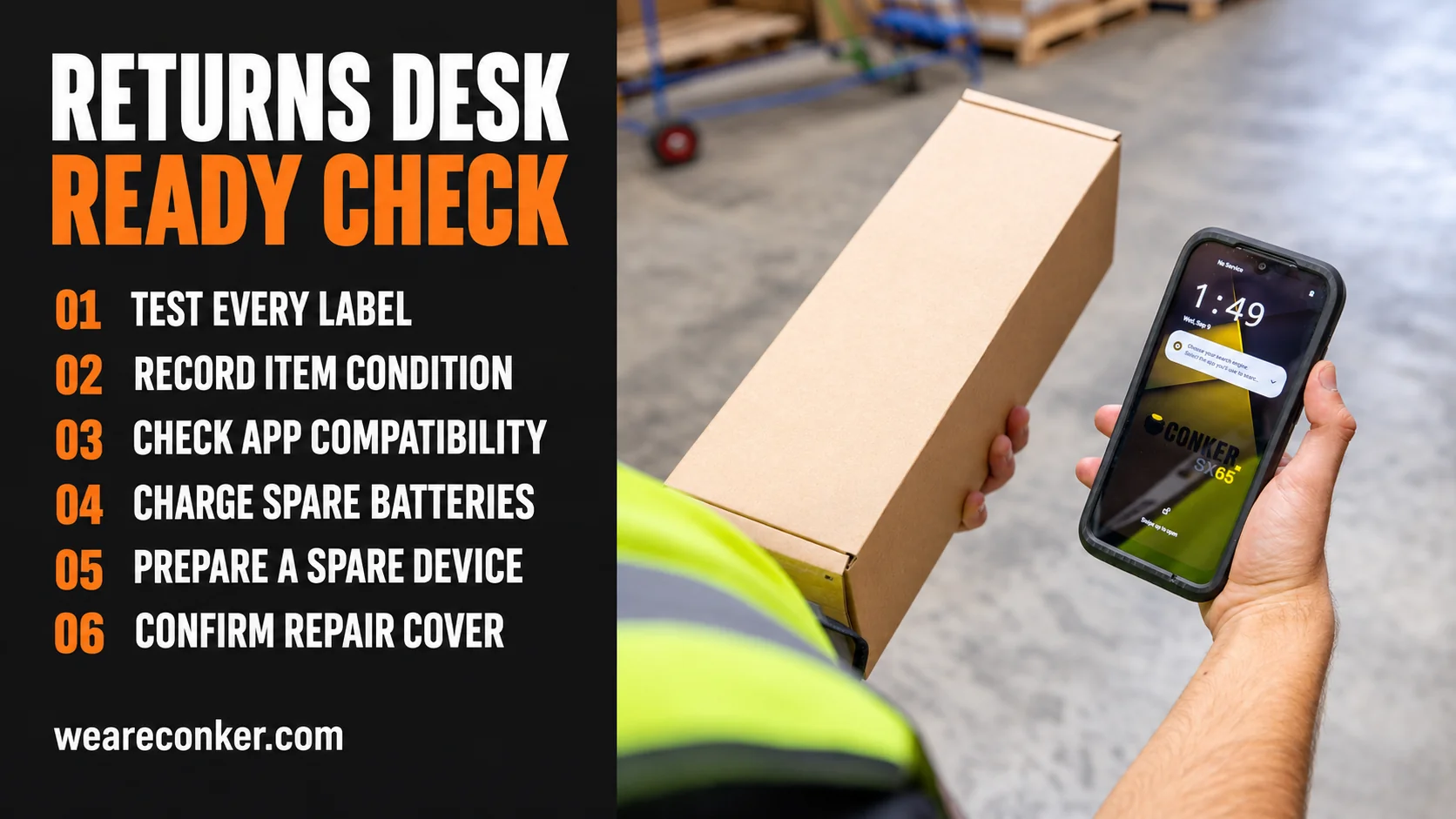
- How many stations and shifts will run, based on your own returns forecast?
- Have you tested the labels and codes that actually reach your warehouse?
- Can staff record a consistent grade and attach usable photos to the order?
- Are spare devices configured and batteries or docks ready?
- Who handles a failure, and what repair, transit and replacement times apply?
- Can IT provision seasonal devices and remove access when assignments end?
If any answer is uncertain, book a project scoping call with Conker. Bring your expected volumes, current devices and returns-software requirements so we can discuss the fit.
Frequently asked questions
When should a warehouse prepare for January returns?
Complete device and workflow checks before Christmas. Returns can build during December, and the busiest day differs by retailer, carrier and whether the data measures requests or received parcels. Use your own history rather than assuming one national peak date applies to you.
What is reverse logistics in a warehouse?
Reverse logistics manages goods moving back from customers. Warehouse tasks include receiving, inspection, grading and routing items to stock, refurbishment, supplier return or recycling.
What devices do you need for warehouse returns processing?
Start with a scanner and a workstation that runs your returns software. Mobile receiving or put-away may suit a handheld; grading may benefit from a larger screen and camera. Wearable scanners are worth testing for repetitive sorting.
Can a consumer smartphone handle returns processing?
Yes, if its app compatibility, scanning, photography and battery performance meet your workload. Test the actual environment and shared-use pattern before choosing it for continuous shifts.
How long do Conker repairs take?
Turnaround depends on your service tier and terms. Conker publishes a one-day target from receipt for RELAX Plus, rather than a guaranteed next-day return to your site. Keep a working spare available while a device is away.